Math expressions
This section builds upon the previous example and adds features that allow computing mathematical expressions on the MARTe2 signals.
The expressions are implemented using the MathExpressionGAM, which allows computing mathematical expressions on the input signals and providing the result in the output signals. The expressions are defined in a configuration file and can use any of the input signals as variables. It also supports Constants in numeric and literal form.
The backend of the MathExpressionGAM is the MathExpressionParser.
In this example, the MathExpressionGAM is used to compute the time taken by all the GAMs to execute their logic by subtracting the write time of the last GAM from the read time of the first GAM, that is: GAMsExecutionTime = GAMDisplay_WriteTime - GAMTimer_ReadTime.
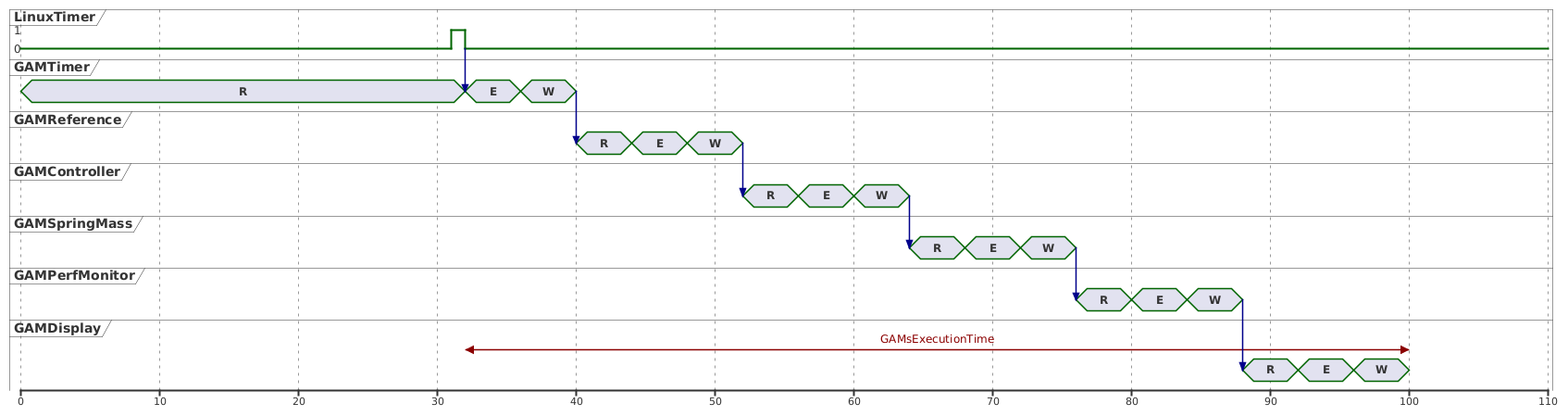
Time required to execute all GAMs.
 1        +GAMMathExpr = {
 2            Class = MathExpressionGAM
 3            Expression = "GAMsExecutionTime = GAMDisplay_WriteTime - GAMTimer_ReadTime;"
 4            InputSignals = {
 5                GAMTimer_ReadTime = {
 6                    DataSource = DDB1
 7                    Type = uint32
 8                }
 9                GAMDisplay_WriteTime = {
10                    DataSource = DDB1
11                    Type = uint32
12                }
13            }
14            OutputSignals = {
15                GAMsExecutionTime = {
16                    DataSource = DDB1
17                    Type = uint32
18                }
19            }
20        }
Warning
The MathExpressionGAM is very sensitive to the types used. Carefully review the documentation of the MathExpressionGAM and ensure that values are cast as required.
Running the application
Start the application with:
./MARTeApp.sh -f ../Configurations/MassSpring/RTApp-MassSpring-8.cfg -l RealTimeLoader -s State1
Once the application is running, inspect the screen output and verify that the log shows the GAMsExecutionTime value. The log should show entries similar to the following:
$ [Information - LoggerBroker.cpp:152]: Thread1FreeTimeHistogram [0:10]:{ 0 0 0 0 0 0 0 0 0 50 23 }
$ [Information - LoggerBroker.cpp:152]: GAMsExecutionTime [0:0]:206
$ [Information - LoggerBroker.cpp:152]: ForceAverage [0:0]:20.342940
Exercises
Ex. 1: Implement the mass spring model with the MathExpressionGAM
The MathExpressionGAM can be used to implement the mass-spring-damper model by defining the equations of motion as mathematical expressions. This allows implementing the model without the need to write a custom GAM, while still benefiting from the features of the MathExpressionGAM.
Consider the continuous-time state-space model of the spring–mass system:
where the state vector is defined as:
and the system dynamics are:
Using forward Euler discretisation with sampling time \(T_s\):
the discrete-time equations become:
Edit the file
../Configurations/MassSpring/RTApp-MassSpring-9.cfgand modify the existingMathExpressionGAM, namedGAMMathModel, to compute the equations above.Connect the output of the
GAMMathModelto theGAMDisplayto log the position and velocity of the mass. In order to avoid conflicting name definitions, call the signalsPositionMandVelocityM.
Solution
The solution is to modify the GAMMathModel and add the equations to the Expression field.
 1        +GAMMathModel = {
 2            Class = MathExpressionGAM
 3            Expression = "m=1.0;
 4                          c=0.5;
 5                          k=10.0;
 6                          dt=0.01;
 7                          PositionM = PositionM_1 + dt * VelocityM;
 8                          VelocityM = VelocityM + dt * (-k/m * PositionM_1 - c/m * VelocityM + Force / m);
 9                          PositionM_1 = PositionM;"
10            InputSignals = {
11                Force = {
12                    DataSource = DDB1
13                    Type = float64
14                }
15                VelocityM = {
16                    DataSource = DDB1
17                    Type = float64
18                }
19                PositionM_1 = {
20                    DataSource = DDB1
21                    Type = float64
22                }
23            }
24            OutputSignals = {
25                PositionM_1 = {
26                    DataSource = DDB1
27                    Type = float64
28                }
29                PositionM = {
30                    DataSource = DDB1
31                    Type = float64
32                }
33                VelocityM = {
34                    DataSource = DDB1
35                    Type = float64
36                }
37            }
38        }
Ex. 2: Compare the output from both models
When running the application, the output given by the GAMMathModel and the one computed by the GAMSpringMass are similar but not exactly the same.
Edit the file
../Configurations/MassSpring/RTApp-MassSpring-10.cfgand add aMathExpressionGAMto compute the difference between thePositionvalue computed by the two models.Why is the
PositionMvalue never converging to the target value? What could be done to modify this behaviour?
Solution
The solution is to add a
MathExpressionGAMto compute the difference.Computation of thePositionErr.1 +GAMMathPositionErr = { 2 Class = MathExpressionGAM 3 Expression = "PositionErr = Position - PositionM;" 4 InputSignals = { 5 Position = { 6 DataSource = DDB1 7 Type = float64 8 } 9 PositionM = { 10 DataSource = DDB1 11 Type = float64 12 } 13 } 14 OutputSignals = { 15 PositionErr = { 16 DataSource = DDB1 17 Type = float64 18 } 19 } 20 }Add the computed signal to the
GAMDisplayto log the error between the two models.Computation of thePositionErr.1 +GAMDisplay = { 2 Class = IOGAM 3 InputSignals = { 4 PositionErr = { 5 DataSource = DDB1 6 Type = float64 7 } 8 OutputSignals = { 9 PositionErr = { 10 DataSource = Display 11 Type = float64 12 }Add the GAM to the execution list.
GAM execution list.1 +Threads = { 2 Class = ReferenceContainer 3 +Thread1 = { 4 Class = RealTimeThread 5 CPUs = 0x1 6 Functions = {GAMPerfMonitor GAMTimer GAMReference GAMController GAMSpringMass GAMMathModel GAMMathPositionErr GAMStats GAMPatchForceDims GAMForceStats GAMHist GAMMathExpr GAMDisplay} 7 } 8 } 9 }The
PositionMvalue is never converging to the target value because theGAMControlleris using thePositionvalue as feedback. Try modifying it to use thePositionMvalue instead.