HotRIO backplane interfaces
The HotRIO backplane allows bidirectional communication between a master Piranha board and up to four HotRIO expansion boards. Each expansion board is equipped with 16 general-purpose LVDS differential pairs, also usable as 32 LVCMOS single-ended connections. Additional LVTTL connections with specific purposes such as sync, reset and microcontroller interrupt are also available. The LVDS pairs are meant for fast communication between the I/O or FPGA on the expansion board and the FPGA on the master board, while the LVTTL signals shall be used for their designated purposes and they can share information between the FPGAs and the microcontrollers.
While the general-purpose pairs can be driven by custom interfaces if needed by the application, some common use cases are covered by the interfaces provided in the backplane_utils module of the hotrio-software library. These interfaces can be instantiated and assigned to adequate FPGA pins by the code generation script backplane_gen.py based on JSON configuration. The description of the purpose and user interface of the backplane_utils modules is given in the following sections.
Description of the interfaces
This section describes the two clocked source-synchronous interfaces available for communication of multi-bit values over the HotRIO backplane. While no interface is provided to transfer single-bit values, the code generation tool allows a “bit” option to transfer information between an expansion board and a master Piranha over a single data line. When using this option, the specified bits will be made available in the interface portlist unprocessed, and the user may connect them as required by the application. This function can also be used to implement custom interfaces while still benefitting from automatic pin assignments.
Both ADC and BUS interfaces share the same timing relationship between clock and data. For single data rate (SDR) modes, the timing is described below:
The transmitter launches the data towards the backplane by driving flip-flops in the Programmable I/O of the FPGA; the clock used to drive these flip-flops is sent to the backplane inverted.
The receiver captures the data at the rising edge of the inverted clock. This corresponds to the falling edge of the internal clock of the transmitter, which is the furthest point in time from data change.
The current version of the script does not generate timing constraints automatically, thus timing closure must be reached by the user keeping the above information into account. More details on the suggested constraints to be added to the top level LDC and LPF for this purpose are discussed in the Backplane interface timing constraints section of this document.
The portlists for each interface (ADC TX/RX, BUS TX/RX) are detailed in the Generated files section.
ADC interfaces
The ADC interface is recommended for communication of data acquired from ADCs or provided to DACs, as well as for any other link where data transfer is synchronous and happens at constant frequency with no interruptions. It consists of a configurable number of data lines and of two auxiliary signals: the data clock (DCLK) and the frame clock (FCLK). While both signals carry a clock waveform, only DCLK is used as a clock in the FPGAs; FCLK is instead sampled at DCLK edges and does not require a clock-capable input pin.
Each ADC interface is unidirectional and can be single data rate (SDR) or double data rate (DDR). The following timing diagram shows the relationships between the signals in the SDR variant, with 4 data lines and 16-bit transmission units:
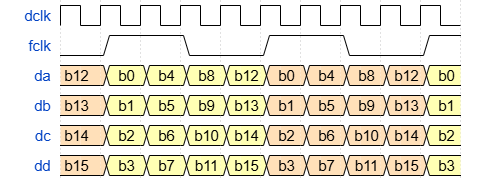
The rising edges of FCLK are used to align the receiver with the boundaries of transmission units. The receiver provides a synchronization flag to detect correctness of the incoming FCLK frequency, as well as a desynchronization event counter. The transmitter generates FCLK and provides it to the user as reference for the frequency at which data should be given to the interface.
Serialization and deserialization over the user-defined number of data lines is performed inside the module. The receiver also performs clock domain crossing (CDC) of the deserialized data from DCLK to the system clock (CLK) of the receiving FPGA. Because of the propagation time of CDC flags, the following inequality must be respected when choosing the size of the transmission unit (bits) and the number of data lines (wires):
This guarantees that the CDC method has enough time to move valid data to the domain of CLK. As an additional restriction, the division between bits and wires must yield an integer number.
An ADC interface may have any number of channels sharing the same DCLK and FCLK lines. All channels are sent and received simultaneously; in fact, they are only a user interface concept, providing separate buses for each value transferred by the interface without corresponding to any modification in the internal structure of the transmitter and receiver.
BUS interfaces
The BUS interface is recommended for communication of commands and messages, as well as for any other link where data transfer happens when needed, with no fixed frequency. It consists of a configurable number of data lines and of two auxiliary signals: the data clock (DCLK) and the “valid” signal.
Each BUS interface is unidirectional and can be single data rate (SDR) or double data rate (DDR). The following timing diagram shows the relationships between the signals in the SDR variant, with 4 data lines and 32-bit transmission units:
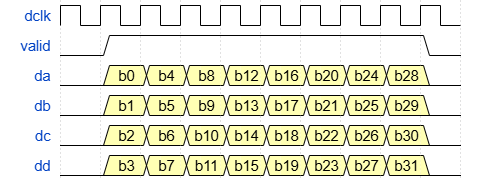
As shown in figure, the valid signal is edge-aligned with valid data serialized over the data lines (wires). As such, the interface can be received by a dual clock FIFO, using “valid” as write enable. This FIFO is automatically generated by the backplane script, and its depth can be configured in the JSON configuration. A single clock FIFO is also used in the transmitter side. These memory modules simplify the UI of the link, allowing the user to put large amounts of data in queue for sending, or to wait the right time before reading values from the interface.
Clock domain crossing is performed in the dual clock FIFO, thus lifting the requirement on the value of “bits/wires”, which can be as low as 1:1.
Automatic generation of backplane interfaces
While the interfaces described in the previous section can be manually instantiated in the top level module of a design, the use of the backplane_gen.py script is suggested. This Python program performs the following operations automatically, reducing the development time required to implement a backplane connection:
Generation of LPF pin assignments: the script selects adequate connections for each interface based on the required I/O standard (LVCMOS or LVDS) and speed (SDR or DDR), allocating clocks to PCLK pins of the FPGA and trying to keep pins belonging to the same bus close together. Manual assignment is also supported through the JSON fields “pin” and “pins” discussed in the JSON syntax section.
Generation of backplane interface VHDL modules: regardless of the number of signals exchanged on the backplane, the script generates one backplane interface module for each expansion board and one for the Master Piranha. These modules are wrappers containing the instances of the formatters and IP cores needed to transfer the specified signals. The VHDL code: Backplane interface wrapper section provides an example on how to map top level signals to the generated entity.
Generation of IP cores for Lattice FPGA: ADC and BUS interfaces require vendor-specific IP cores to instantiate I/O primitives and FIFO memory. As the implementation of these modules may vary based on clock frequency and on the amount of data to be transferred in a single burst, the IP cores are not pre-built and they are instead generated together with the backplane interface VHDL. The script calls Lattice Diamond to generate the IPs, thus requiring a functional Diamond installation with a valid license.
At each step, the script generates two paired codes, one for the Master Piranha and one for the current expansion board being processed, thus avoiding mismatch between pins and/or between interfaces on the two sides of the connection. Generated files are placed in the folder of their corresponding JSON, overwriting any files with the same name as them. For this reason, it is advisable to place the JSON in a directory where no LPF and VHD files are stored. Placement of two JSON files used in the same backplane in the same folder is also discouraged, as it can lead to IP cores overwriting each other if there are signals with the same names in the two configurations.
To use the script prepare a JSON configuration for the Master Piranha and one for each expansion board connected to it as shown in the next section, then run the following command (replacing “path/to” with the appropriate paths):
python3 path/to/hotrio-software/Firmware/Scripts/backplane_gen.py --cfg path/to/master_piranha_cfg.json
The configuration file given as “–cfg” argument to the command can have any name. Its basename is used to determine the name of the Master Piranha VHD and LPF outputs, which will be respectively “backplane_interface_basename.vhd” and “basename.lpf”.
JSON syntax
To give instructions to the script, the user shall write JSON configurations of two distinct categories:
Master Piranha JSON: this short configuration identifies which expansion boards are connected to which backplane slots and provides paths to the expansion board JSON configurations.
Expansion board JSON: these configuration files describe the signals to be exchanged between their respective expansion boards and the Master Piranha through the backplane. The required interfaces shall be listed here.
Master Piranha configuration
The following example showcases the syntax of the Master Piranha JSON configuration:
{
    "expansion_boards" : {
        "sp1" : {
            "file" : "../../sp1/Source/bus_test_sp1.json",
            "board" : "piranha",
            "slot" : 1
        },
        "sp2" : {
            "file" : "../../sp2/Source/bus_test_sp2.json",
            "board" : "piranha",
            "slot" : 2
        },
        "sp3" : {
            "file" : "../../sp3/Source/bus_test_sp3.json",
            "board" : "piranha",
            "slot" : 3
        },
        "sp4" : {
            "file" : "../../sp4/Source/bus_test_sp4.json",
            "board" : "piranha",
            "slot" : 4
        }
    }
}
The expansion_boards object is mandatory, while any other top level objects or fields will be ignored. Inside expansion_boards, the user shall specify between 1 and 4 arbitrarily named objects, each representing an expansion board connected to the backplane. Expansion board object names are added as prefix to the signals that belong to the interface with the respective boards in the Master Piranha VHDL output.
Expansion board objects must have the following three mandatory fields (any other fields will be ignored):
file: Path to the expansion board JSON. It can be an absolute path or a relative path from the location of this JSON.
board: Expansion board type. It can be set to one of the following strings: piranha, viper, bolometer_p4, bolometer_p5, tijuca_ecp3, io. If the desired board does not belong to this list, use “io” for the time being; more boards may be specifically supported in the future.
slot: The backplane slot where the expansion board shall be placed. Must be a number between 1 and 4, and there cannot be two boards allocated to the same slot.
Warning
Note that when selecting “io” as board type the tool will assume all pins of the expansion board are clock-capable and DDR-capable, and no VHDL code will be generated for the expansion board. If this is not acceptable due to the characteristics of the unsupported expansion board, manual pin assignments via the “pin” and “pins” fields in the expansion board JSON may be used to avoid errors in the allocation of clocks and DDR data lines.
Expansion board configuration
The following example showcases the syntax of an expansion board JSON configuration:
{
    "clk10_main" : {
        "direction" : "in",
        "io_standard" : "lvds",
        "type" : "pll_input"
    },
    "pps" : {
        "direction" : "in",
        "io_standard" : "lvds",
        "type" : "bit",
        "pin" : 3
    },
    "commands" : {
        "direction" : "in",
        "io_standard" : "lvds",
        "type" : "bus",
        "bits" : 24,
        "wires" : 3,
        "frequency" : 125.0,
        "ddr" : false,
        "pins" : [21, 25, 27, 29, 31]
    },
    "measurements" : {
        "direction" : "out",
        "io_standard" : "lvds",
        "type" : "adcs",
        "bits" : 20,
        "wires" : 2,
        "frequency" : 100.0,
        "cdc_frequency" : 125.0,
        "adcs" : [
            "voltage1",
            "voltage2",
            "current"
        ]
    }
}
This JSON may contain any number of arbitrarily named objects, as long as the collective number of backplane connections they require does not exceed the amount available on the board. Object names are used to identify the interfaces in the generated VHDL code. Each object represents a signal to be transferred on the backplane.
Any fields outside the top level objects, as well as any fields different from those listed in this document, will be ignored. Some fields are mandatory for all signal objects, others are mandatory only for specific signal types, and others are completely optional. There are three mandatory fields:
direction: All signals are unidirectional. Directions are specified relative to the expansion board. The possible values are in (transfer from Master to expansion board) and out (transfer from expansion board to master).
io_standard: Must be either lvds or lvcmos. The specified I/O standard is applied to all wires needed to implement the signal. Any other standard specified will result in the inference of lvcmos I/O.
type: The signal type defines what interface will be implemented, affecting pin assignments and determining what modules will be instantiated in the backplane interface architecture. The script supports the following values for this field:
adc: A single-channel ADC interface as defined in the previous section, to stream data continuously at constant frequency. It requires bits, wires and frequency as additional mandatory fields. This interface uses wires + 2 backplane connections, of which one PCLK pin.
adcs: Same as above, but with support for multiple channels by means of the additional adcs mandatory field. This interface uses wires * length(adcs) + 2 backplane connections, of which one PCLK pin.
bit: One or more 1-bit signals to be transferred between the boards unchanged. No interface is instantiated for them; instead, each wire is directly connected between the portlist of the generated wrapper and the backplane. It supports wires as an optional field.
bus: A BUS interface as defined in the previous section, to transfer messages and other sporadic bursts of information. This interface uses wires + 2 backplane connections, of which one PCLK pin.
clock: A 1-bit clock signal. It is generated in the same way as bit, but the automatic pin assigner will ensure that the signal is connected to a PCLK pin on the receiving side.
pll_input: A 1-bit clock signal that will exclusively drive a PLL input on the receiving side. It is generated in the same way as bit, but the automatic pin assigner will ensure that the signal is connected to a GPLL pin on the receiving side. The PLL is not automatically generated: it shall be instantiated by the user in the top level VHD, and the “PLL Reference Clock from Pin” box shall be checked in the IP core settings.
Warning
The script does not know whether the chosen I/O standard for a signal is adequate to its communication frequency. For example, a 200 MHz LVCMOS bus will be generated with no error, but the interface is very likely to fail due to electrical issues.
Note
Some expansion board backplane connections have limited access to PCLK and GPLL pins. If more primary clock inputs are required, the following strategy can be followed:
If there are any free GPLL pins, primary clocks can be defined as pll_input instead of clock. In the top level VHD, the user can then instantiate a bypassed PLL to access the clock.
Otherwise, if there are any free GR_PCLK pins, primary clocks can be defined as clock and manually assigned to these pins with the pin optional field.
If the additional clocks are needed as part of adc, adcs or bus interfaces, pins must be manually assigned in both cases.
If more PLL inputs are needed, a similar strategy can be followed: if there are any free PCLK pins (first choice) or GR_PCLK pins (second choice), the PLL inputs can be defined as clock; if GR_PCLK pins are used, they must be assigned manually with the pin field. When these methods are used to accomodate PLL inputs, their respective PLL IP cores must leave “PLL Reference Clock from Pin” unchecked.
The optional and situationally mandatory fields are described here:
bits: Mandatory in signals of type adc, adcs and bus. The number of bits in a single transmission unit exchanged by the interface. Must be an integer multiple of wires. It determines the data bus width generated for the signal in the portlist of the backplane interface wrapper. bits is also the distance between word alignment boundaries: when the reset is released in the receiver, incoming data is ignored until the start of the next transmission unit.
wires: Mandatory in signals of type adc, adcs and bus; optional in signals of type bit. Specifies the number of backplane connections used to transfer data by the signal. Auxiliary signals like DCLK, FCLK and Valid are not included in the count. In the case of an adcs interface, the given number will refer to each single channel: for example, an interface with three channels and wires = 2 will have 6 data connections.
frequency: Mandatory in signals of type adc, adcs and bus. The frequency of the clock transmitted or received over the backplane, given in MHz. This determines how fast data is pushed onto the wires; the maximum frequency at which transmission units of width bits are transferred is instead calculated as follows:
cdc_frequency: Mandatory in signals of type adc and adcs when the cdc field is set to true or unspecified. Shall be set to the frequency of the system clock used to retrieve data words from the interface, expressed as a real number in MHz.
ddr: Optional for all signals. If unspecified, the signal is assumed to be SDR. It is a boolean field, to be set to true (without quotes) if a DDR interface is required, or if a clock faster than 200 MHz needs to be transferred with the clock or pll_input signal types. In the current version of the script, generation of DDR parallel interfaces is still unsupported, and an error will be produced if any adc, adcs or bus signal is marked as DDR.
adcs: Mandatory only for signals of type adcs. Its value shall be a list of arbitrary channel names; one channel will be instantiated for each name in the list, and the names will be included in the channel-specific ports in the backplane interface wrapper portlist.
cdc: Optional in signals of type adc and adcs. It is a boolean field with default true if unspecified. When set to false, clock domain crossing logic will not be included in the RX module of the interface. No input clock port will be provided at the receiver, which will use the DCLK to drive all its internal logic.
pin: Optional for all signals without a wires field. Assigns a specific backplane connection to the signal by means of an integer between 1 and 32. To relate these integers to the actual FPGA pins, look for signals of the form LVDS_XX_Y in the expansion board schematic. LVDS_n_P corresponds to number 2n - 1, while LVDS_n_N corresponds to number 2n. If the chosen I/O standard for the signal is LVDS, pin should be set to the positive wire of a pair, represented by an odd number. LVCMOS signals can instead be assigned both to even and odd numbers, as long as they do not use a negative wire whose complement is already assigned to an LVDS signal.
pins: Optional for all signals with a wires field. Provides manual assignments for all pins used by the signal. Its value shall be a list of integers between 1 and 32, each of which follows the same rules as the pin field. In signals of type adc, adcs and bus, the order of assignment from left to right shall be DCLK, then FCLK/Valid, then wires from first to last channel and from LSB to MSB within each channel.
dio/dios: Optional in the signals of expansion boards with “io” type. These fields are alternate versions of pin and pins to tie manual assignments to the DIO indices of the HotRIO DIO backend instead of tying them to ordinal integers as in the fields above. Simultaneous use of pin/pins and one of these fields in the same signal is forbidden.
Warning
Usage of the pin and/or pins fields allows mapping signals to inadequate pins. For example, it can result in clock resources routed to non-clock pins, or in differential output primitives instantiated on single-ended-only output pads. If this happens, the script may complete without error while producing VHDL code that could induce MAP or PAR errors or exhibit unexpected behaviour.
Note
Master Piranha slots, while mostly equivalent, differ in the placement of the GPLL pin in their pin table. Thus, interfaces that use a dedicated PLL input pin may need modifications if moved from a slot to another.
Generated files
After a successful run of the backplane_gen.py script, several output files are made available in the directories where the Master Piranha JSON and the expansion board JSON files are stored. The JSON configurations may be placed anywhere, but the suggested approach is to place each JSON in the Source folder of the firmware project for the corresponding board, where the JSON for the register tree is also stored. This ensures that all the output files are generated by the script inside the projects where they are meant to be used.
To integrate the generated backplane interface in the design some files need to be copied to various locations in the each project and some code must be added to the top level files, as described below.
Lattice Preference Files (LPF)
One LPF file is generated next to each JSON, carrying information on the pin assignments and on the chosen I/O standards for each signal. Only one LPF file can be active at a time in a Lattice FPGA design; therefore, these files shall not be used directly in the projects. Instead, the content of each file shall be copied into the corresponding top level LPF, alongside any other pin assignments required by the board.
Note
Some timing constraints will need to be added to the top level LPF as well, to guarantee that the backplane interface functions correctly. These are not inside the text generated by the script, and they can be specified as described in the Backplane interface timing constraints section.
VHDL code: Device-specific IP cores
adc, adcs and bus interfaces require IP cores by Lattice to perform their functions correctly. These modules are generated by the SCUBA software included in Lattice Diamond based on configuration parameters. The backplane_gen script determines these parameters from those specified in the JSON files and passes them to SCUBA for generation. The resulting vhd files should be kept separate from the rest of the source code, in case they need to be replaced when porting to a different device. For simplicity, in the firmware for each board, it is advised to move these files to a common location in the IP cores folder, such as Source/ip_cores/backplane_ip/hdl, which can then be included in the dependencies.
The generated IP cores are I/O primitive controllers and FIFO memory modules. In the Master Piranha, their names follow the templates shown below; in expansion boards, board name will not be included.
{board name}_{signal name}_sdr_tx: Single data rate output controller (used by adc, adcs and bus).
{board name}_{signal name}_sdr_rx: Single data rate input controller (used by adc, adcs and bus).
{board name}_{signal name}_fifo: Single clock domain FIFO (used by bus only).
{board name}_{signal name}_fifo_dc: Dual clock domain FIFO (used by bus only).
VHDL code: Backplane interface wrapper
All interfaces needed to transfer the signals listed in the expansion board JSON configurations are included in VHDL wrapper modules by the script. Up to 5 modules are generated: one for the Master Piranha and one for each expansion board that has a Lattice FPGA. The default names for these vhd files start with the “backplane_interface_” prefix, followed either by the extensionless basename of the Master Piranha configuration (for the master interface) or by the object name of an expansion board in the Master Piranha configuration (for the expansion board interfaces).
In each board’s firmware project, the backplane interface wrapper shall be placed under Source/modules, in its own module folder. An example of this arrangement would be Source/modules/backplane_interface_sp1/hdl/backplane_interface_sp1.vhd. To use the wrapper in the design, it shall be instantiated in the top level with a port map statement, making sure that the module path (such as Source/modules/backplane_interface_sp1) is included in the dependencies file.
The following port map is an example of a backplane interface wrapper instance, corresponding to the expansion board JSON in the example above. While the interfaces may change from project to project, the backplane_i and backplane_o ports will always be present, and shall be connected with ports with the same name and width in the top level entity.
backplane_sp1_inst : entity work.backplane_interface_sp1
  port map (
    -- "clock" type signal, RX interface
    clk10_main_o => clk10_s,

    -- "bit" type signal, RX interface
    pps_o => pps_s,

    -- "bus" type signal, RX interface
    commands_clk_i     => clk100_s,
    commands_rstn_i    => rstn_clk10_s,
    commands_rden_i    => not cmd_empty_s,
    commands_data_o    => command_s,
    commands_empty_o   => cmd_empty_s,
    commands_err_cnt_o => cmd_errors_s,
    commands_dclk_o    => clk125_s,

    -- "adcs" type signal, TX interface
    measurements_dclk_i     => clk100_s,
    measurements_rstn_i     => rstn_clk50_s,
    measurements_voltage1_i => ch1_data_s,
    measurements_voltage2_i => ch2_data_s,
    measurements_current_i  => ch3_data_s,
    measurements_fclk_o     => fclk_s,

    -- backplane connections
    backplane_i => backplane_i,
    backplane_o => backplane_o
  );
As seen in this map, clock and bit signals result in an output port in the receiving side. Correspondingly, an input port is generated in the transmitting side. Signals of pll_input type are accessed in the same way.
adc, adcs and bus interfaces provide more complex portlists to the user, varying depending on data direction. The ports for each interface are described below:
adc TX: wrappers containing an adc transmitter provide ports to insert data directly into the serializer module. The frequency at which new data shall be sent is given by the frame clock output. These are the ports to be mapped:
dclk_i: Clock to be sent on the backplane. Its frequency must match the one specified in configuration.
rstn_i: Active low synchronous reset that restores the initial state of the serializer.
data_i: Data word to be sent on the backplane. Should be updated synchronously with dclk_i and no more than once per fclk_o period (or twice if DDR). Width matches the bits value specified in configuration.
fclk_o: Frame clock as defined in the first section. Should be used to synchronize data insertion in the data_i port, noting that SDR interfaces sample at its rising edge while DDR ones do at both edges.
Port map template:
-- "adc" type signal, TX interface
{name}_dclk_i => ,
{name}_rstn_i => ,
{name}_data_i => ,
{name}_fclk_o =>
adc RX: wrappers containing an adc receiver provide a set of ports to access data as soon as it is available and to check the status of the link. These are the ports to be mapped:
clk_i: Local system clock used to read data and status information. Does not go on the backplane and does not need to match the frequency specified in configuration. All other ports except for dclk_o are synchronous to this clock. If the cdc field was set to false in configuration, this port will be missing and all signals will be synchronous to dclk_o.
rstn_i: Active low synchronous reset that restores the initial state of the deserializer. Note that this reset should be asserted for a minimum duration of three cycles of the slowest between clk_i and dclk_o.
data_o: Received data, registered and only enabled to change when valid_o is high. Data is lost if this port is not read before the arrival of the next valid_o pulse.
valid_o: Valid flag that pulses high for one clk_i cycle to notify the arrival of a new data word at data_o. New data can be equal to previous data; in this case, valid_o will still pulse. In normal conditions, it is a pulse train with the same frequency as the frame clock of the transmitter (or double that frequency if DDR). In case of desynchronization of the interface, the flag will not pulse.
sync_o: Interface synchronization status flag. When low, the receiver is trying to synchronize its internal state with the frame clock; when high, synchronization is established and data can be retrieved.
cnt_frame_err_o: Error counter reporting how many times synchronization with the frame clock was lost since the last reset.
dclk_o: Clock received from the backplane as part of the interface. Its frequency matches the one specified in configuration. If there is no need to use it in the logic, this port can be left open.
Port map template:
-- "adc" type signal, RX interface
{name}_clk_i           => ,
{name}_rstn_i          => ,
{name}_data_o          => ,
{name}_valid_o         => ,
{name}_sync_o          => ,
{name}_cnt_frame_err_o => ,
{name}_dclk_o          =>
bus TX: wrappers containing a bus transmitter are equipped with ports meant to control the input side of a single clock FIFO memory module. The user queues data for transmission by driving a write enable high. These are the ports to be mapped:
dclk_i: Clock to be sent on the backplane. Its frequency must match the one specified in configuration.
rstn_i: Active low synchronous reset that clears the FIFO memory and restores the initial state of the serializer.
wren_i: Write enable signal. Set to 1 when data is being provided to the interface.
data_i: Data to be written to the FIFO. To be changed synchronously with dclk_i. Width matches the bits value specified in configuration.
err_cnt_o: Error counter reporting the number of data insertions that have been ignored due to a full FIFO since the last reset.
Port map template:
-- "bus" type signal, TX interface
{name}_dclk_i    => ,
{name}_rstn_i    => ,
{name}_wren_i    => ,
{name}_data_i    => ,
{name}_err_cnt_o =>
bus RX: wrappers containing a bus receiver are equipped with ports meant to read data from the output side of a dual clock FIFO memory. An empty flag goes low when data is available, then the user may retrieve it at any time by asserting a read enable. These are the ports to be mapped:
clk_i: Local system clock used to read the FIFO. Does not go on the backplane and does not need to match the frequency specified in configuration. All other ports except for dclk_o are synchronous to this clock.
rstn_i: Active low synchronous reset that clears the FIFO memory and restores the initial state of the deserializer. Note that this reset should be asserted for a minimum duration of three cycles of the slowest between clk_i and dclk_o.
rden_i: Read enable signal. Set to 1 when data is ready to be fetched from the FIFO to be used in the logic. Note that data will be ready for capture two cycles after assertion of this signal.
data_o: FIFO output. Width matches the bits value specified in configuration. Shall be sampled two cycles after raising rden_i.
empty_o: Empty flag, high when no data is available for reading, low otherwise. The user should not set rden_i to 1 while this flag is high.
err_cnt_o: Error counter reporting the number of data words lost on arrival due to a full FIFO since the last reset.
dclk_o: Clock received from the backplane as part of the interface. Its frequency matches the one specified in configuration. If there is no need to use it in the logic, this port can be left open.
Port map template:
-- "bus" type signal, RX interface
{name}_clk_i     => ,
{name}_rstn_i    => ,
{name}_rden_i    => ,
{name}_data_o    => ,
{name}_empty_o   => ,
{name}_err_cnt_o => ,
{name}_dclk_o    =>
Note
While their reset is asserted, TX interfaces do not transmit the dclk on the backplane, causing any logic using that clock on the RX side to stop. Error counters in the bus receivers do not detect a missing dclk as an error.
Backplane interface timing constraints
The inclusion of timing constraints in the top level LDC and LPF files of each project is essential to guarantee that interfaces involving synchronous I/O will behave as expected. As anticipated in the previous sections, backplane_gen.py does not generate these constraints automatically. As a result, if a bitstream is generated immediately after including the file generated by the script, communication may fail unpredictably.
To prevent these issues, three types of timing constraints shall be defined: clock period, input setup and clock to out.
Constraints specified in the LPF will be used in MAP and PAR, while those specified in the LDC will also be used in synthesis. However, input setup and clock to out are easier to define with LPF syntax, and timing closure can usually be reached without adding them to the LDC as well.
This section provides suggestions on how to compute adequate values for each constraint. Specific applications may require deviation from these guidelines in order to achieve timing closure; furthermore, these suggestions only cover constraints needed by the backplane interface wrappers: most projects will require to append them to other constraints regarding the rest of the design.
Clock period
Clock period constraints drive timing analysis of paths between synchronous elements inside the FPGA. All the input and output clocks of the wrapper module shall be constrained in the LDC file with create_clock statements. The syntax is shown in the example below:
create_clock -name NAME -period PERIOD [get_ports PORT]
where NAME can be any string, PERIOD shall be a floating point number in nanoseconds, and PORT shall be the name of the top level port through which the clock enters the FPGA. If the clock is generated internally, use get_nets instead of get_ports and refer to the post-synthesis name of the net object representing the clock.
If two externally provided clocks are related, their relationship can be specified in the LPF with the CLKSKEWDIFF statement, following this syntax:
CLKSKEWDIFF CLKPORT "port1" CLKPORT "port2" skew ns ;
where port1 and port2 are the clock ports used in create_clock and skew is a floating point number in nanoseconds.
If the two clocks are instead unrelated, this can be conveyed to Diamond with a set_clock_groups statement in the LDC. This requires caution, as it will disable timing analysis of the inter-clock-domain paths. The syntax for this statement is as follows:
set_clock_groups -asynchronous -group [get_clocks {NAMES}] -group [get_clocks {NAMES}]
where NAMES are space-separated lists of clock names as defined in create_clock. Clocks listed in the same group will be considered related, while those in different groups will be considered unrelated.
Warning
If there are paths between the domains of two externally provided clocks, either CLKSKEWDIFF or set_clock_groups should be defined, otherwise Diamond will assume the clocks are related with a clock skew of 0 ns, leading to the execeution of an irrelevant timing analysis, based on a wrong assumption.
I/O constraints
As synchronous interfaces over the backplane are always multi-bit, I/O constraints shall be applied to the groups of pins that constitute each interface. Before applying the constraints, these groups must be defined in the LPF with the DEFINE PORT GROUP statement. An example for a 4-wire interface is shown below (it has 5 ports, as one is dedicated to the frame clock or valid flag):
DEFINE PORT GROUP "example_group" "backplane_i[1]"
"backplane_i[2]"
"backplane_i[3]"
"backplane_i[4]"
"backplane_i[5]" ;
To find which backplane_i or backplane_o ports should be added to the group, open the generated wrapper module and search for the I/O IP core of the signal, whose name ends with sdr_tx or sdr_rx. Its data port will be connected to the backplane_i/o range to be included in the group. Its clock port will also report a backplane_i/o connection that will be useful when stating the constraints explained below.
Clock to out
Clock to out constraints drive timing analysis of paths from synchronous elements inside the FPGA to the output pads of the device. They must be specified for all TX interfaces included in the wrapper, by means of CLOCK_TO_OUT statements in the LPF. See the template below for the syntax of this statement:
CLOCK_TO_OUT GROUP "group_name" MAX max ns MIN min ns CLKNET "clknet_name" CLKOUT PORT "clkout_name" ;
where group_name shall match the name chosen at group definition and max and min are the highest and smallest acceptable delays from the rising edge of the DCLK at port clkout_name to the arrival of data at the pins included in the group. Finally, clknet_name shall be the post-synthesis name of the net object that represents the clock that drives the interface and gets sent to port clkout_name.
When choosing values for this constraint, the suggested approach differs depending on the type of device at the other end of the backplane connection, which may be an ASIC (such as a DAC) or another FPGA.
If data is sent to an ASIC, maximum and minimum clock to out are determined as follows:
max = (clock period) - (ASIC input setup time) - (data-clock skew on the traces)min = (ASIC input hold time) - (clock-data skew on the traces)The setup and hold times can be found on the datasheet of the external device, and the skews (both data-clock and clock-data) can be conservatively set to 1 ns for the HotRIO backplane.
If data is sent to another FPGA there is a degree of freedom in the choice of I/O constraints. For example, relaxing the clock to out requirements will result in stricter input setup requirements, and vice versa. However, the usage of I/O primitives in both sides of the connection results in fixed I/O timing regardless of constraints.
This does not mean that constraints should not be stated, as they may reveal that the interface does not meet timing. If this is the case, manual modifications of the I/O IP cores, such as delay insertion, must be performed by the user. Knowing that the implementation will not change based on the chosen constraints, a simple algorithm can be followed to find constraints that do not result in false positive or false negative error reports:
Set max to a positive value that’s small compared to the clock period, and set min to a small negative value.
If these strict constraints result in timing violations, relax them slightly until there are no violations anymore.
The resulting values will be treated as max and min external device clock to out when determining input setup in the other FPGA.
If the input setup constraints fail, manual intervention on the interface IPs is needed.
Input setup
Input setup constraints drive timing analysis of paths from input pads of the FPGA to synchronous elements in its fabric. They must be specified for all RX interfaces included in the wrapper, by means of INPUT_SETUP statements in the LPF. See the template below for the syntax of this statement:
INPUT_SETUP GROUP "group_name" setup ns HOLD hold ns CLKPORT "clkin_name" CLK_OFFSET -0.5 X SS ;
where group_name shall match the name chosen at group definition, setup is the minimum time interval between data arrival on the grouped pins and the next rising edge of the clock, and hold is the earliest data arrival time with respect to the clock edge that launched it. clkin_name is the port connected to the DCLK of the interface. A clock offset of \(-0.5x\) is used to take into account the clock inversion in the PIO block of the transmitter, allowing the user to state constraints as if the clock was not inverted.
The setup and hold times for this constraint can be calculated as follows:
Trace skews can be set conservatively to 1 ns in both constraints, as was done for the clock to out constraint. Note that the actual setup and hold times of the synchronous elements of the receiving FPGA are not taken into account in these calculations, as they are automatically inserted by Diamond during timing analysis.
Timing constraints example
The following example represents timing constraints for a connection with two interfaces:
A 4-wire adc receiver placed on the ports backplane_i(5 downto 0), with a 125 MHz DCLK and a 200 MHz system clock derived from a 50 MHz clock input through a PLL.
A 2-wire bus transmitter placed on the ports backplane_o(3 downto 0), using the 200 MHz system clock as DCLK.
create_clock -name local_oscillator -period 20.0 [get_ports {clk50_i}]
create_clock -name system_clock -period 5.0 [get_nets {clk200_s}]
create_clock -name adc_dclk -period 8.0 [get_ports {backplane_i[0]}]
set_clock_groups -asynchronous -group [get_clocks {local_oscillator system_clock}] -group [get_clocks {adc_dclk}]
DEFINE PORT GROUP "adc_rx_example" "backplane_i[1]"
"backplane_i[2]"
"backplane_i[3]"
"backplane_i[4]"
"backplane_i[5]" ;

DEFINE PORT GROUP "bus_tx_example" "backplane_o[1]"
"backplane_o[2]"
"backplane_o[3]" ;

INPUT_SETUP GROUP "adc_example" 3.0 ns HOLD -2.0 ns CLKPORT "backplane_i[0]" CLK_OFFSET -0.5 X SS ;

CLOCK_TO_OUT GROUP "bus_tx_example" MAX 1.0 ns MIN -0.5 ns CLKNET "clk200_s" CLKOUT PORT "backplane_o[0]" ;